
How do I take good candle product photos?
Backgrounds, shot list and sizes for candle listings, from one photo of your candle
Updated
Quick answer
Take one clean, well-lit photo of your candle, then place it into warm lifestyle scenes (wood, linen, stone, bath and bedside settings) for most of your listing, and keep one plain white image for marketplace main photos. With Lume you upload the photo, pick a candle scene from the catalog and get a finished image in minutes, not a studio day, from 1 credit (about $0.15 on Pro). Check the label text against your real candle before you publish.
The six shots a candle listing needs
| Shot | Why buyers need it | Shape |
|---|---|---|
| Plain white, front on | The main image on Amazon and many marketplaces; shows jar, label and colour clearly | 1:1 |
| Lit, in a cosy room | Sells the mood, which is why people buy candles | 4:5 or 1:1 |
| On a bedside table or bath tray | Shows where it lives and how big it is next to everyday objects | 4:3 |
| With scent notes as props | Lavender, citrus or wood props say what it smells like | 1:1 |
| Gift set or packaging | Candles are a top gift; show the box, ribbon or set | 4:3 |
| Vertical story or Reel | For Instagram, TikTok and Pinterest ads | 9:16 |
Square (1:1) is on every Lume plan. 4:5, 4:3 and 9:16 are on Pro and above.
Getting the upload photo right
- Clean the jar. Fingerprints and dust on glass show up in every scene.
- Use soft window light. A flash bounces off glass and tin lids and hides the label.
- Keep the camera level with the label. Shooting from above bends the text.
- Lit or unlit, decide first. The scene keeps your candle as photographed, so upload a lit photo if you want a lit result.
- Fill most of the frame. A small candle in a big room gives the AI less detail to work with.
Candle scenes in the Lume catalog
 Aromatic candle with warm glow
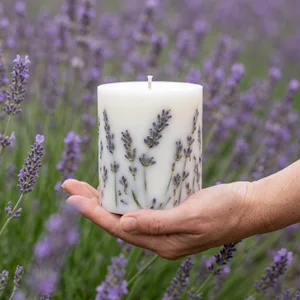 Lavender candle in a blooming field
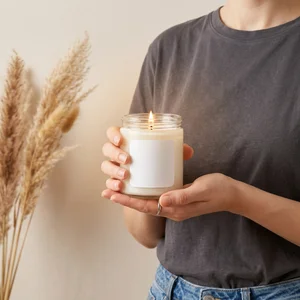 Cozy candle held by model
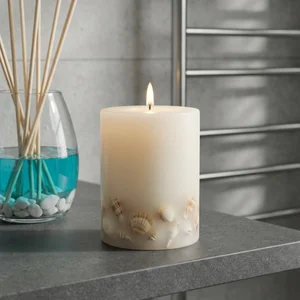 Coastal seashell candle and diffuser
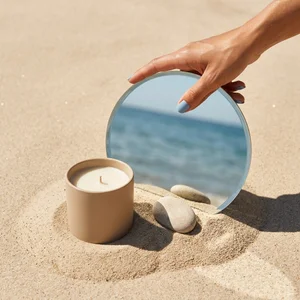 Summer beach candle with mirror
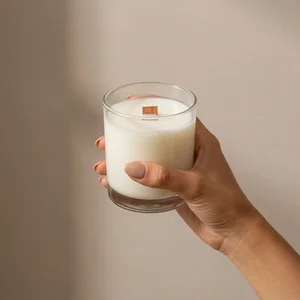 Hand holding wooden wick candle
Sizes and cost
| Size | Square image | Credits | Plans |
|---|---|---|---|
| 1K | 1024 x 1024 | 1 | All, including Free |
| 2K | 2048 x 2048 | 2 | Pro and above |
| 4K | 4096 x 4096 | 3 | Business and above |
Related
Frequently asked questions
- What is the best background for candle product photos?
- Use a plain white or light background for the main marketplace image, then warm, cosy scenes for the rest: wood, linen, stone, a bedside table or a bath tray. Candles are bought for the mood they create, so most of the listing should show that mood.
- Should I photograph my candle lit or unlit?
- Both. Buyers want to see the glow, but they also need a clear view of the jar, label and wax. If you want a lit shot in Lume, upload a photo of the candle lit, so the flame and glow come from your real candle rather than being invented.
- How do I stop glass jars from looking messy in photos?
- Wipe fingerprints and dust off before you take the upload photo, shoot in soft daylight from a window rather than with a flash, and keep the camera level with the label. Lume works from the photo you upload, so a clean jar in gives a clean jar out.
- Will AI change the text on my candle label?
- It can. Small text is the hardest thing for any image AI to keep exactly. Always zoom in and compare the label with your real candle before you use an image, and generate again if anything differs.
- What size should candle photos be for Etsy, Shopify and Amazon?
- Aim for at least 2000 pixels on the long side. A Lume square image at 2K is 2048 x 2048 pixels, and 4K is 4096 x 4096. 2K is on Pro and above, 4K on Business and above.
- How much does it cost to make candle photos with Lume?
- One credit per 1K image, two for 2K and three for 4K. Pro is $9 a month for 60 credits, so a 1K candle shot costs about 15 cents. New accounts get free credits to try it first.
Make your first candle photo
Start with 3 free credits, no credit card required
Get started